Developer Notes
YaPyCon is basically doing two things:
It launches a QT Console for Jupyter in its own process.
It launches a Remote Procedure Call “server” (in its own thread) and links the context of the console with the context of the plugin.
Having a program launch a Python console to provide scripting capabilities to another program is the least difficult part of this endeavour, thanks to projects like qtconsole.
The most “challenging” part is #2 and the main reason why YaPyCon works and “looks” the way it does.
To understand why, it is essential to understand how YASARA launches a plugin and how does that plugin communicate back with the main process that launched it.
YASARA - Plugin communications
Let us first have a look at what happens when YASARA launches a plugin. Here is a diagram with all the key actors involved:
Simplified sequence diagram of the plugin launching process.
And, having described the initialisation part, let us now try to “call” a YASARA command from within Python, for example
ListAtom() :
Simplified sequence diagram of “calling” a YASARA command with return results.
Remarks
The key points to note here are:
YASARA accepts commands about what to do via the
stdoutof the plugin process.YASARA returns command results back to the plugin via a a local socket server that is launched as part of the initialisation process. 1
A “YASARA command” always implies a Yanaconda command. There are “no actual Python bindings”. All of the functions in
yasara.pyare very simple adapters that format a string with the equivalent Yanaconda command and pass it back to YASARA. This communication is handled byrunretval()of theyasara.pymodule. Every one of the Python functions is structured along the following template:def some_function(p1, p2, pn=None): # Build the equivalent Yanaconda command yanaconda_string = f"SomeFunction parameter1={p1}, parameter2={p2}" if pn is not None: yanaconda_string += f" pn={pn}" # Send it to YASARA command_result = runretval(yanaconda_string) # Return the value to the Python code return command_result
And here is a (simplified) view of what happens within
runretval():def runretval(command): global com # If the Local_Socket_Server has not been initialised yet, initialise it here. if (com==None): com = yasara_communicator() # Use stdout to send the command to YASARA and use the Local_Socket_Server # port p to return the results. sys.stdout.write('ExecRV%d: '%com.port+command+'\n') sys.stdout.flush() # Accept the connection immediately com.accept() return(com.receivemessage(com.RESULT))
At this point, try not to worry too much about “Pythonisms” or optimisations and focus on understanding the round-trip from Python function call to returning any results.
When is this not working?
This process works (has worked) sufficiently well as long as yasara.py is imported by the same process that
launched the plugin. In that case, the stdout that yasara.py is using is the exact same stdout that the
plugin “sees” as well and everything works well.
But, what is different when yasara.py is imported by a process that is different than the plugin process?
Just as it happens in the case of YaPyCon, the plugin itself launches the Python Console as a separate process 2. This creates a complete mismatch in two points:
The
stdoutstream of the new processes is entirely unrelated to thestdoutthat YASARA is connected to.For example, in the case of the Python Console, the
stdoutis simply redirected to the console itself.
Importing
yasara.pyfrom that separate process, will still go through the initialisation process (“Initialise plugin variables”), it will re-discover a completely different portp(launching yet anotherLocal_Socket_Server) and will attempt to pass that port information back to YASARA. That step will fail, becausestdoutis not pointing back to YASARA. At that point, the whole plugin hangs waiting for a response from the main YASARA program (that is now not even aware that a Yanaconda command was sent to it).
These two conditions render any subsequent use of import yasara from other processes entirely useless 3.
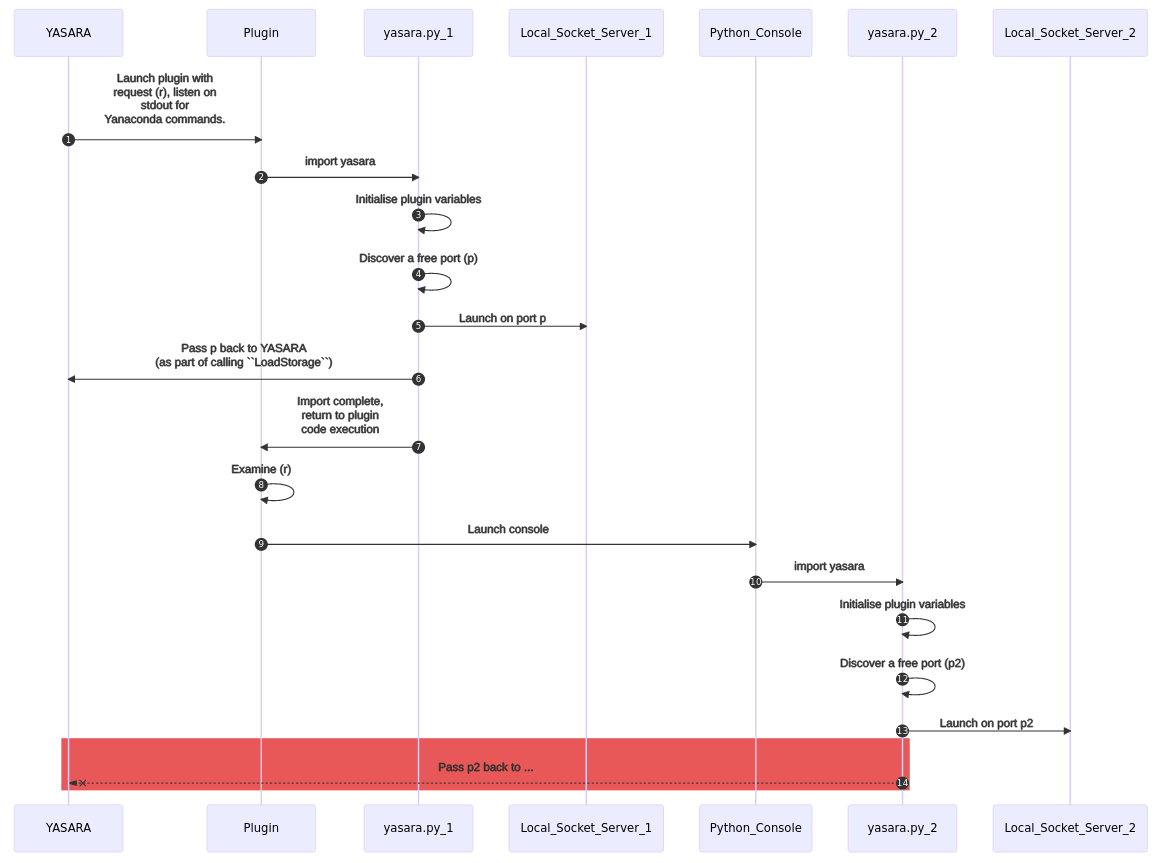
In this sequence, that last step is getting lost in the “pipework”.
Remarks
There is no need to launch a new local server because the plugin has already started one. That is not too problematic in itself, after all, YASARA only needs to know which server to send its response to.
The connection to the processes’
stdouthas been lost. Therefore, therunretval()ofyasara.pyas imported from the console process cannot communicate with the original YASARA process.
Adding Remote Procedure Calling
The solution to this situation was to find a way to “propagate” the already initialised variables, from
yasara.py to any subsequent processes.
And this way was Remote Procedure Calling (RPC), via the rpyc module.
rpyc provides a convenient mechanism for a Python program to call functions or access memory as if it was part of
the context of one process but in actual fact these residing elsewhere (in a different process or even different
computer). This solution is similar to launching yet another socket server but acting in an almost transparent way to
coordinate calls across the network.
Adding the yasara_kernel.py module
In a typical YASARA plugin, yasara.py must be the first module to be imported by a plugin for it to be able to
communicate with the main YASARA program.
Similarly, from within the Python console, the first thing to do is to import yasara_kernel.py.
The two modules are almost identical. However, in developing YaPyCon it was quickly realised that:
For backwards compatibility and the stability of YASARA, it was not possible to alter the existing
yasara.pyat all.yasara.pyprovided access to a number of functions that could work in a “self-destructing” way if launched from within YaPyCon. For example, allowingExit()could lead to “zombie” processes where the Python Console could still go on after having sent a command to YASARA to close.Decoupling
yasara_kernel.pyfromyasara.pyprovided an additional flexibility to modify the structure of the module without worrying about the effect of these modifications to existing plugins.Part of these modifications was to add functions for “unpacking” certain result types as returned by YASARA, for convenience. In any case, such “unpacking” is expected to commonly occur in a given plugin, apart from trivial cases.
How YaPyCon works
Having described all this, a simplified view of the main actors in the communications between the YASARA Python Console and the main process of YASARA now looks like this:
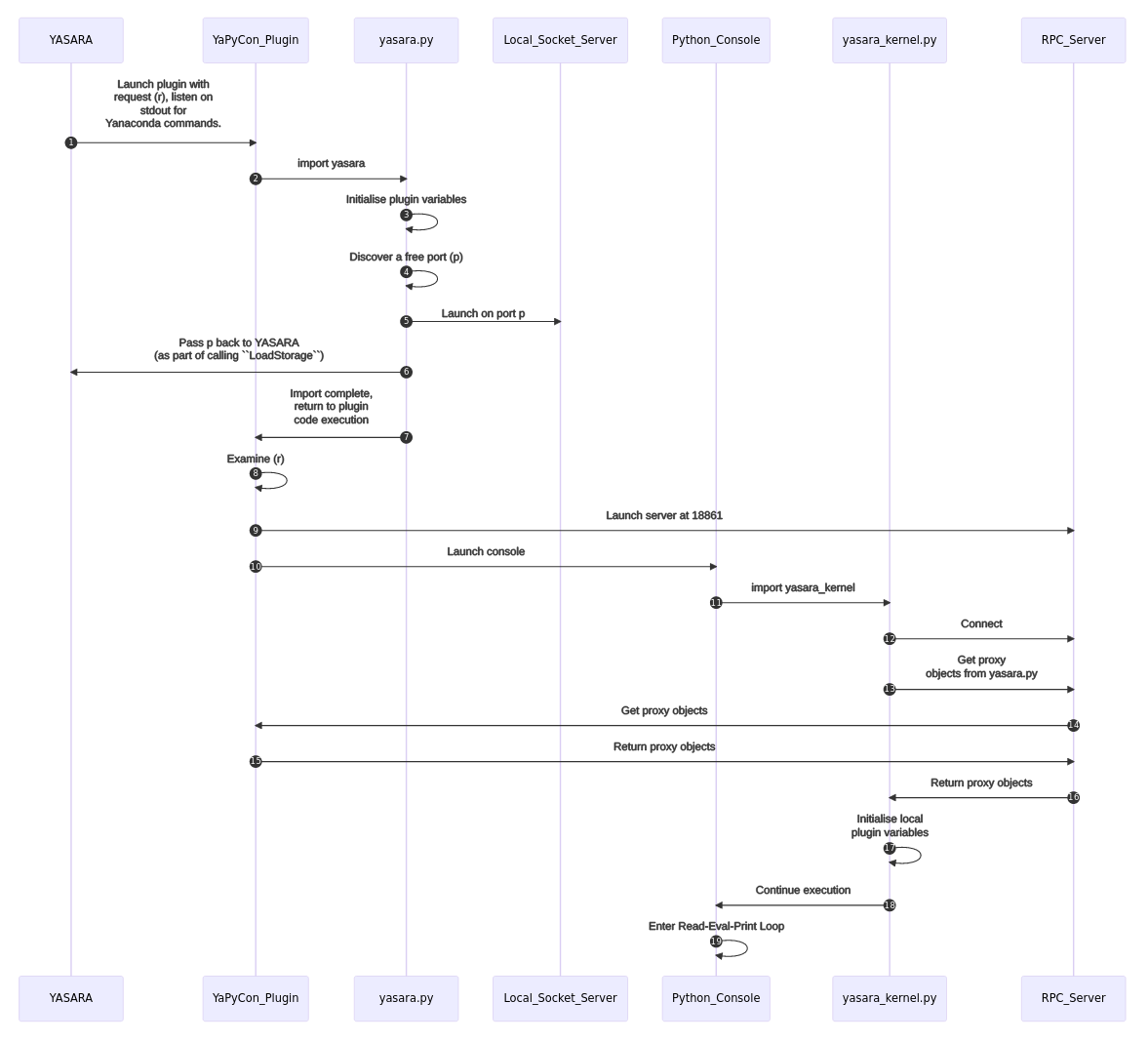
For more details about each of the points mentioned in this section, please see Code documentation
- 1
This process is simplified here for economy of space. More accurately, the discovery of a free port and the socket server binding are handled by class
yasara_communicatorthat is “constructed” as part of theLoadStorage()command. The latter is called as part of theyasara.pyinitialisation of variables.- 2
Again, this is a simplification for economy of space and scope. In actual fact, the Python console is launched as a set of processes, threads and communication channels because of the way the Jupyter protocol operates. A full description of that would be out of the scope of this document but mich more information is available at the Messaging in Jupyter section in the main
jupyter_clientdocumentation.- 3
This is not unknown to the YASARA developers. In fact,
yasara.pyincludes a workaround that allows one to take control of YASARA from a browser. This is solved via launching yet anotherLocal_Socket_Serverand more information is available at Plugins can start additional programs that control YASARA, like a Python module